
M3U vs Xtream Codes: What's the Difference and Which Should You Use in 2026?
Compare M3U playlists and Xtream Codes logins for IPTV: setup, TV guide, movies and series, player support and security, and which method fits you.
M3U is a playlist format: a plain-text list of entries, each with a name, optional details such as a group or a TV-guide id, and the address of a stream. Xtream Codes is a login: you enter a server URL, a username and a password, and a compatible player asks the provider's server for its lists of channels, categories, movies, series and guide data. Neither is better for every player or subscription. The right one depends on what your provider supplies, what your player accepts and which features you need.
Both are ways for a player to find out what a service offers. Neither is a separate IPTV service, and neither sets the picture quality. When a provider offers both for the same account, they often lead to the same streams, although what each one exposes, such as movies, series or catch-up, can differ.
M3U vs Xtream Codes: Quick Comparison
“Possible” below means the method allows it. Whether you actually get it depends on your provider and your player.
| Feature | M3U playlist | Xtream Codes login |
|---|---|---|
| Connection method | A playlist file, or a link that returns one | A login to the provider's server, which the player asks for lists |
| What you enter | The playlist file or link | A server URL (often with a port), a username and a password |
| Live TV organisation | Groups set in each entry of the playlist | Categories supplied by the server |
| Movies and series | Possible, through attributes that differ between players | Commonly separate movie and series categories, with seasons and episodes when the server provides them |
| TV guide (EPG) | A guide address in the playlist or the player, matched to channels by id | Guide data requested from the server, when the provider supplies it |
| Updates | A saved file is a snapshot; a link can be reloaded | Lists come from the server whenever the player refreshes them |
| Player compatibility | Accepted by every player in our player comparison and by Kodi's IPTV Simple Client | Only players with an Xtream Codes login, such as TiviMate and OTT Navigator |
| Credentials | A playlist link may contain a token or your username and password | A username and password, often sent with every request |
| Ease of setup | Paste one link or open one file | Type three details exactly as sent |
| Catch-up | Possible with catch-up attributes, if the provider records programmes | Possible through the server, if the provider records programmes |
| Stream quality | Not set by the method | Not set by the method |
| Local file | Yes: a playlist can be a file on the device (the streams still need the internet) | No: the player must reach the server |
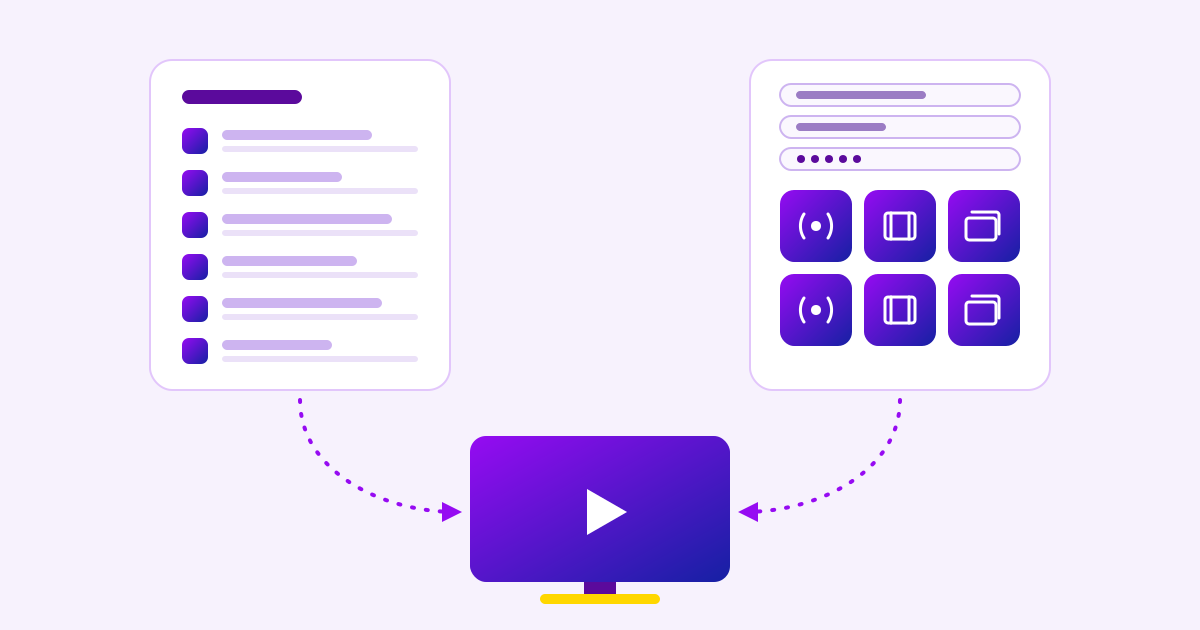
M3U playlist
- PlayerYou add a playlist file or link
- PlaylistOne text list, downloaded and read as a whole
- Channel entriesNames, groups, guide ids and stream addresses
Xtream Codes login
- PlayerYou sign in with a server URL, username and password
- Xtream-style APIThe server answers the player's requests
- Structured listsCategories, channels, movies, series and guide data
Both paths
Video stream
The player opens a stream address supplied by the service. With either method it can be the same stream; the method does not set its source, resolution or bitrate.
What Is an M3U IPTV Playlist?
An M3U playlist is a plain-text file. In the extended form that IPTV uses, it starts with an #EXTM3U line, and each entry is an #EXTINF line with the channel's details, followed by the address of its stream. The playlist is not the video: it lists where each stream can be found, and the player opens that address when you choose the channel.
#EXTM3U x-tvg-url="https://guide.example.invalid/epg.xml"#EXTINF:-1 tvg-id="news.example" tvg-logo="https://img.example.invalid/news.png" group-title="News",Example Newshttps://stream.example.invalid/live/news.m3u8- #EXTM3U marks an extended M3U playlist. Here it also carries x-tvg-url, the address of an XMLTV TV guide (OTT Navigator also accepts the name url-tvg).
- #EXTINF:-1 starts an entry. The -1 is a duration, which a live channel does not have; OTT Navigator documents that it is ignored.
- tvg-id is the id used to match the channel to its guide listings, and tvg-logo points to its logo.
- group-title puts the channel in a group, such as News. Kodi's IPTV Simple Client and OTT Navigator both accept several groups separated by semicolons.
- The text after the comma is the name shown in the channel list, and the next line is the stream address.
A playlist file or a playlist link
A playlist saved on your device is a snapshot of the channels when it was saved; OTT Navigator, for example, copies a playlist file once and never updates it. A playlist link is fetched from the provider, so it can return new contents each time the player reloads it. Kodi's IPTV Simple Client can refresh a remote playlist at a set interval or once a day, and OTT Navigator can reload one on a timer. When you have the choice, a link stays current.
What Is an Xtream Codes Login?
An Xtream Codes login is three details from your provider: a server URL, a username and a password. “Xtream Codes” is the name players give this style of login, and servers that accept it are described as Xtream-compatible.
Server URL: http://tv.example.invalid:8080Username: your-usernamePassword: ••••••••Instead of reading one list, the player uses these details to send requests to the server's API. It asks separately for the live categories, the channels in each, the movie and series categories, a series' seasons and episodes, and guide data for a channel. That is how open-source Xtream-compatible clients work, and why OTT Navigator says an Xtream login gives more than a playlist link: the media library of movies and series, the archive, a TV guide for each channel and the account's expiry date.
Two caveats. Xtream Codes is not a published standard like HLS: players follow how compatible servers behave, details differ between servers, and a server can only return what the provider has set up. And it is not a video format, codec or resolution. It is a way of fetching lists; the video still comes from stream addresses that the server supplies.
Xtream-compatible servers can also produce an M3U playlist for the same account, as a link with the username and password inside it. OTT Navigator recognises such a link (it contains get.php?username=) and offers to move the details into its Xtream Codes template.
M3U vs M3U8: Are They the Same?
Mostly the same format, but the extension alone does not tell you what a link contains. By convention, .m3u8 marks an M3U file saved as UTF-8 text, which can hold channel names in any language.
The name also belongs to HLS (HTTP Live Streaming), published as RFC 8216. HLS builds on extended M3U and keeps its #EXTM3U and #EXTINF tags, requires every playlist to be UTF-8 and accepts either .m3u8 or .m3u. But an HLS playlist describes a single stream: a media playlist lists the short segments of video to download, and a master playlist lists versions of the same stream at different qualities. In HLS, #EXTINF gives a segment's length in seconds; in an IPTV playlist, it introduces a channel.
So “M3U8” can mean two different things in IPTV. The playlist your provider gives you is a channel catalogue, while a stream address inside it, like the one ending in news.m3u8 in the example above, can be an HLS playlist for one channel. Entering a single stream's .m3u8 address as a playlist gives you that one stream at most, not a channel list. OTT Navigator's playlist option accepts .m3u, .m3u8 “or any other link that returns a list of channels”, and that is the test that matters.
EPG and Channel Organisation
With an M3U playlist, the TV guide comes from an XMLTV file whose address is in the playlist header (x-tvg-url) or set in the player. The player then matches guide channels to playlist channels: Kodi's IPTV Simple Client first compares each guide channel's id with the playlist's tvg-id, then tries tvg-name and then the channel name. Groups come from group-title, so the playlist decides how channels are organised.
With an Xtream login, the player asks the server for its categories and the channels in each, and can request guide data for a specific channel. Organisation follows the provider's own categories, but only in players that support the login and only as far as the server supplies it.
Neither method guarantees a complete or correct guide. If the provider has no listings for a channel, or the ids do not match, the guide stays empty either way. For blank guides, wrong programmes or times that are off, see why an IPTV guide stops working.
Movies, Series and Catch-Up
Xtream-compatible servers commonly keep movies and series apart from live channels, each with its own categories, and return a series' seasons and episodes on request. Players with an Xtream login can show them as a separate library.
M3U is not limited to live channels, but how a playlist marks films and episodes depends on the player. Kodi's IPTV Simple Client treats entries marked media="true" (or with media-dir or media-size) as media rather than channels. OTT Navigator moves entries marked type="movie" or type="series" into its media library, gathers entries with tvg-season and tvg-episode into series, and can load a separate library playlist named in vod_library. A playlist written for one player's conventions may appear as plain channels in another.
Catch-up follows the same pattern. M3U playlists can carry catch-up attributes such as catchup, catchup-days and catchup-source, which both players document, and an Xtream login can give access to the provider's archive. In every case the provider must actually record programmes and make them available to your account: neither method creates movies, series or catch-up that the service does not supply.
Which IPTV Players Support Each Method?
Players differ, so check which inputs your app offers before you choose. According to each developer's own documentation:
- TiviMate accepts M3U playlists, Xtream Codes and Stalker Portal (Google Play listing).
- OTT Navigator accepts a playlist link, a playlist file, Xtream Codes, MAC Portal and Stalker Portal, and suggests its Xtream template when you paste an Xtream-style playlist link.
- Kodi's IPTV Simple Client takes M3U playlists with XMLTV guides, from a local file or a URL. Its documentation describes no Xtream login.
If your app only has a playlist option, M3U is your method whatever your provider prefers; if it only has a login screen, you need Xtream details. For device-by-device choices, including IBO Player and Smarters Pro, see the best IPTV players compared.
Is Xtream Codes Faster or Better for Buffering?
Not inherently. Resolution, codec and bitrate are set when the provider encodes the stream; reliability depends on the provider's servers; and buffering depends on the network between those servers and your screen, including your Wi-Fi. The connection method changes how the player gets its lists, not how the video is delivered. When an M3U link and an Xtream login lead to the same stream, you are watching the same stream.
What can differ is how lists load. An M3U playlist is downloaded and read as a whole, while an Xtream-style player can request one category at a time. That can make browsing feel different in a particular app, but it is a difference between player implementations, not evidence that one method plays video better, and it has not been measured here. If streams buffer or freeze, find where the problem starts before you change methods.
Are M3U Links and Xtream Logins Secure?
Neither method is automatically safer, because both usually carry credentials. A playlist link may contain an access token or, in the common Xtream-style form, your username and password in the address itself. An Xtream login keeps the details in separate fields on your screen, but compatible players commonly send the username and password with every request to the server, as open-source Xtream clients do.
The connection matters too. With an https:// address, requests are encrypted on their way to the server; with http://, the address and everything in it, credentials included, travel unencrypted. Most leaks are simpler, though: a full playlist link in a screenshot, a forwarded message, a forum post or an app log works like a password.
- Use legitimate, authorised services, and take playlists and logins only from your provider.
- Keep your username, password and full playlist link private, and crop them out of screenshots.
- Do not paste an authenticated playlist link into public playlist checkers or other unknown websites.
- Prefer an https:// server address when your provider offers one.
- If you think your details have leaked, ask your provider to change them.
Which Should You Use?
What did your provider give you?
A playlist file or link
A .m3u or .m3u8 address, or any link that returns a channel list
Then Use your player's playlist (M3U) option. Prefer the link to a saved file, so the list can update.
A server URL, username and password
Three separate details, sent together
Then Use your player's Xtream Codes login, if it has one. Enter each detail exactly as sent.
Both
A playlist link and a login for the same account
Then Choose by what your player supports and what you need, such as the provider's movies, series or catch-up.
A link with a username and password inside it
For example, an address containing get.php?username=
Then It is a playlist made by an Xtream-style server. Either option may work, and it is as private as a password.
Use M3U when
- Your player asks for a playlist file or link.
- You want a portable list that works in many players.
- You have a valid playlist link from your provider.
- Your app has no Xtream login.
Consider Xtream Codes when
- Your provider supplies Xtream details.
- Your player has an Xtream login.
- You want live TV, movies and series organised separately.
- The provider's server offers the features you need, such as catch-up or the guide.
Neither is better when
- Your provider supports only one method.
- Both lead to the same streams.
- The details you want, such as a guide or series information, are not supplied.
- The problem is the network or the source, which neither method changes.
If you are a tereatv customer, common tereatv questions cover which login details you receive.
Common Connection Mistakes
- A playlist link in the server field. Many Xtream logins expect only the server address and port. Some players extract it from a full link; others simply fail.
- A wrong server address or port. A missing http:// or https://, a missing port or a typing error points the player at nothing.
- Extra spaces. Details copied from a message can carry a space at the start or end.
- Mismatched credentials. Usernames and passwords can be case-sensitive, so enter them exactly as sent.
- The wrong method. Xtream details entered as a playlist, or a playlist link entered as a login.
- An unavailable playlist link. If the server refuses the request or is down, the player has nothing to load; what IPTV error codes mean explains the responses you may see.
- Features the server does not offer. A movie or catch-up section can be empty simply because the provider does not supply it.
To set up tereatv itself, follow the tereatv setup guide rather than general advice.
Sources
- OTT Navigator documentation: M3U playlist format, choosing a provider template and adding an Xtream Codes provider
- Kodi IPTV Simple Client (official add-on documentation)
- RFC 8216: HTTP Live Streaming (Informational, August 2017)
- TiviMate on Google Play (Armobsoft FZE)
- Jellyfin Xtream plugin client code: an open-source Xtream-compatible client, showing common API requests (an implementation, not a formal specification)
- RFC 9110, section 4.2.2: the https URI scheme
Checked on November 3, 2026. This article compares documented behaviour: nothing was measured, and no real playlists or accounts were used. tereatv is not affiliated with the developers named.
Related Pages
Setup Guide
Step-by-step activation in IBO Player, on Fire TV and with Xtream Codes.
Open the setup guideFAQ
Short answers about plans, devices, simultaneous streams and setup.
Read the FAQContact
Ask a question on WhatsApp before or after you order.
Contact tereatv